Illustration. Your numbers will differ.
Free PC cleaner for Windows 11 and 10Your PC, seen from orbit.
Cosmo Cleaner is a free PC cleaner and disk space analyzer. It maps every file on every drive, shows you what is junk and why, cleans it with a preview and a vault, and keeps an eye on performance, memory, drivers and heat. Free forever. Nothing about your PC is ever sent.
Windows 10 and 11, 64-bit. Unzip anywhere, double-click CosmoCleaner.exe. How it runs
Descent
Down to one drive.
The map below is an illustration of one drive: 476 GB, 830,000 files. In the app the numbers are yours.
The map
First, look.
A scan covers every drive and millions of files and draws them as one map. A real drive with 830,000 files took about two minutes.
The map
Color is category. Size is bytes.
Every tile is a folder, sized by what it holds and colored by what it is: games, video, photos, code, system. What takes the room is obvious before you read a number.
The junk
Junk shows itself.
37 categories: temp files, caches, browser caches, logs, crash dumps, Windows Update leftovers, installers, shader caches, orphaned leftovers, the recycle bin. Each with a confidence score and a reason.
The preview
Preview first. Always.
Before anything moves you see what would go, how much comes back and how sure Cosmo Cleaner is. Untick what you want to keep. Nothing happens until you click Clean.
The sweep
Then, sweep.
Removed tiles collapse off the map into free space. Duplicates, similar photos and large old files have their own hunters, with archive to zip when you would rather keep than delete.
Done
6.8 GB back.
2,318 items in the vault for 30 days, an Undo right there in the toast, and a report of what changed. That is one clean. The rest of the app is below.
Ready when you are.
Download freeIn the app
The same map, in the app.
The story above is an illustration. This is the space analyzer after a scan of one drive, and the cleaner after its analysis, both on the app's demo data. Treemap, sunburst, heatmap and timeline share one scan, so what has not been touched in years and what arrived last week are one click away.
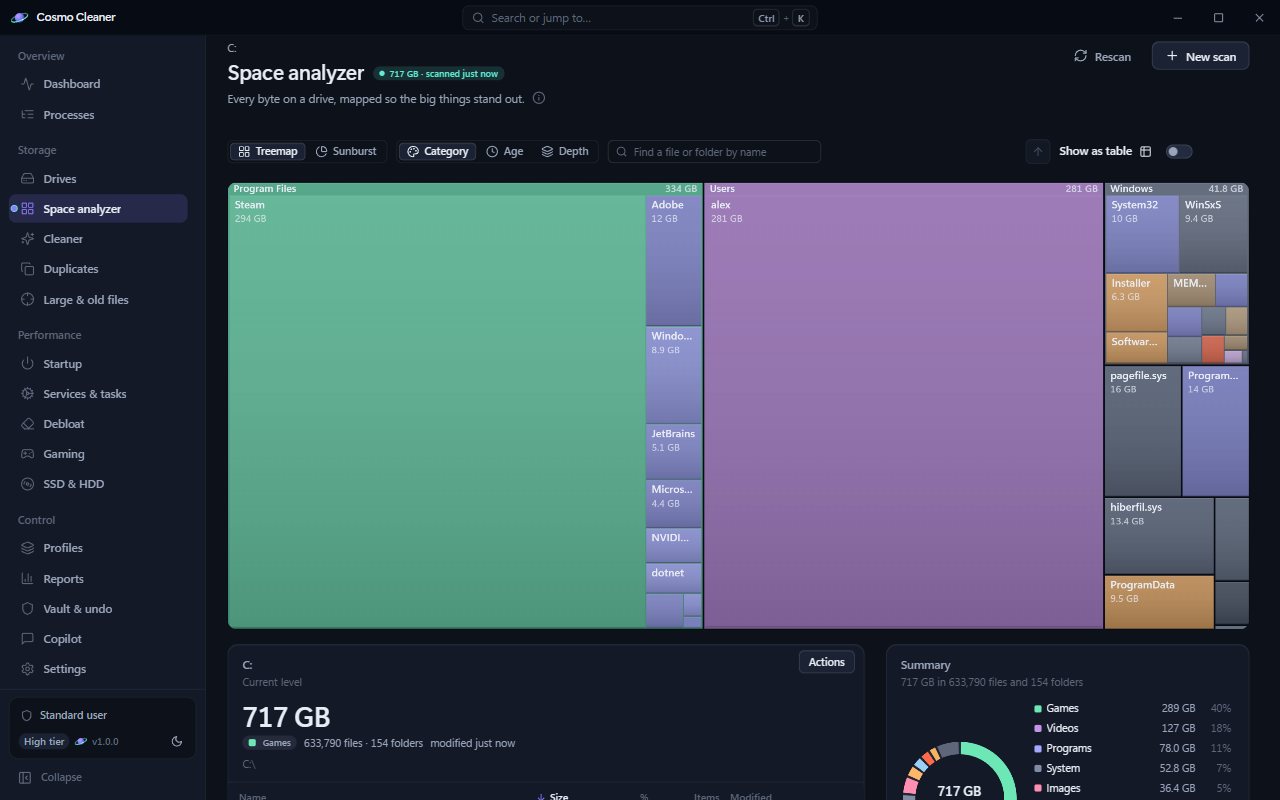
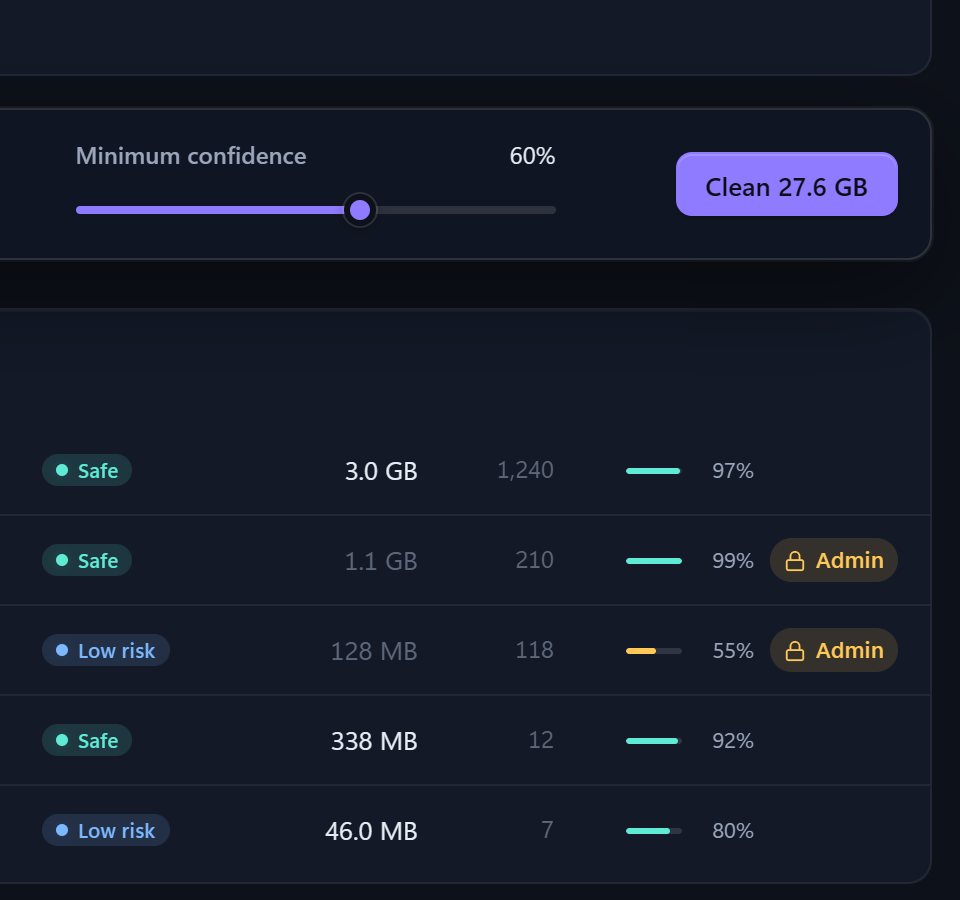
Illustration. Your numbers will differ.
The vault
Cleaned, not gone.
What the cleaner removes waits in the vault for 30 days and comes back with one click. Emptying the recycle bin is the one exception; the app says so before you do it.
The record
Undo, and the paper trail.
An undo journal reverses the last thing you did. An audit log keeps the whole record. Before a system-wide change you can ask for a Windows restore point first; that part needs administrator.
Cleaner removals are reversible for 30 days.
Download freeInstruments
Instruments for the rest of the machine.
Space is half the story. The same console watches what the PC is doing right now and helps you change it, reversibly.
- CPUper core, one-minute history
- Memoryin use, cached, free
- GPUload and video memory
- Diskread and write, per drive
- Networkdown and up
- Temperatureswhere the hardware reports them
- Powerplan and source
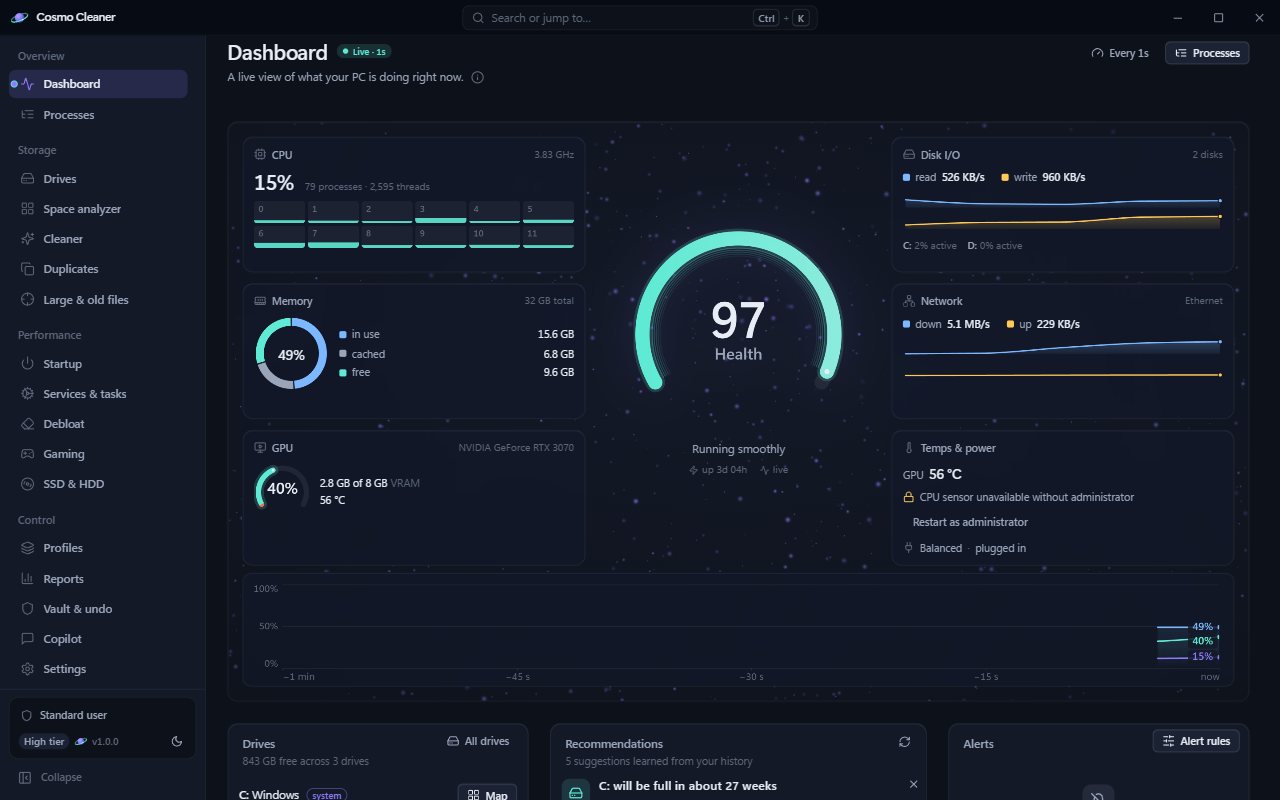
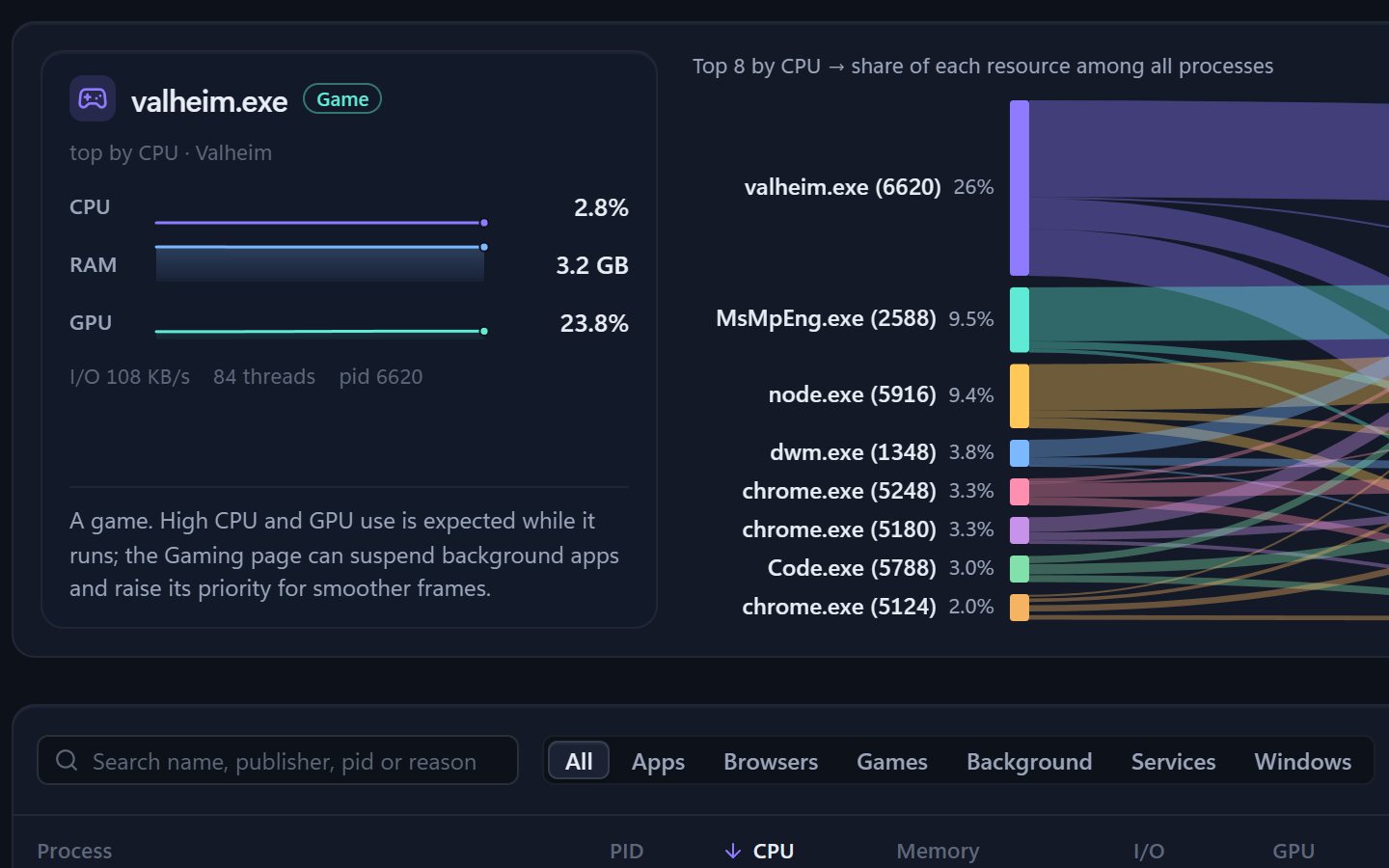
Why is this using resources?
Process intelligence answers in plain language: what a process is, what it is doing right now and whether that is normal. Suggestions when there is something to do.
Memory new in 1.2
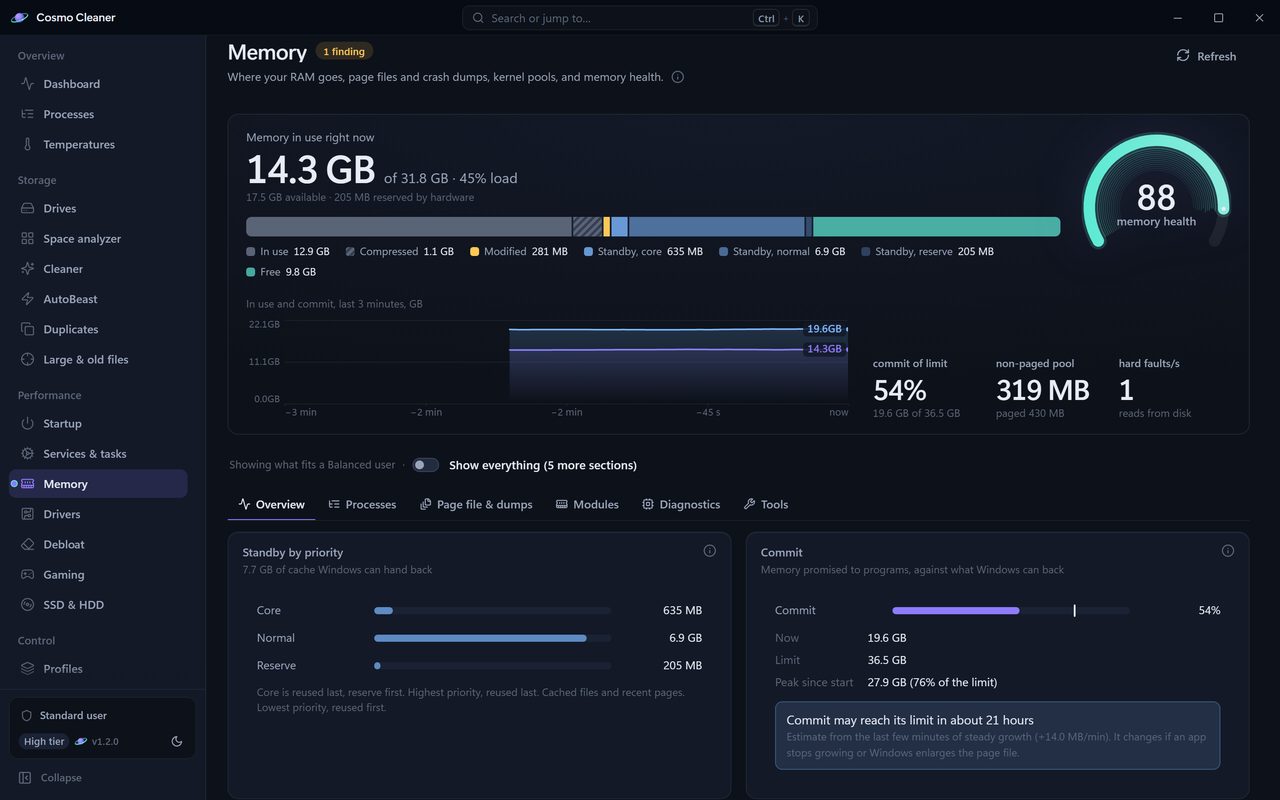
Where the RAM went.
The Memory page reads RAM the way Windows does: in use, modified, standby by priority, compressed and free. Commit charge is set against its limit, with a forecast of when it would get there. Page files and crash dump settings sit beside it with a recommended size, and every change you make there can be undone.
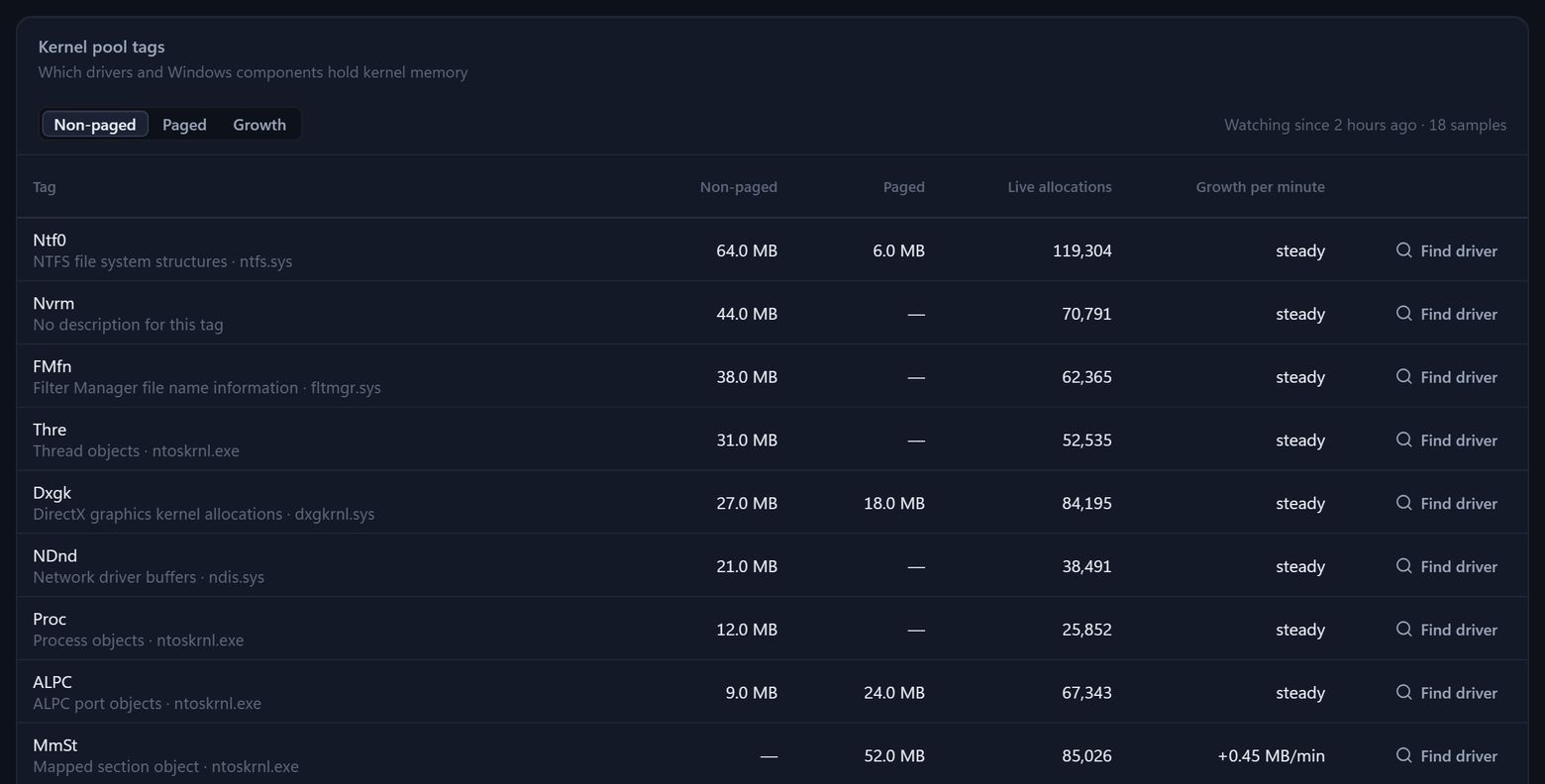
Kernel pools, by tag.
When the non-paged pool keeps growing, a driver is usually behind it. The pools view lists every tag with the driver or Windows component that owns it and its growth per minute, flags a leak once it has watched for a few minutes, and Find driver names the file. Programs that only ever grow are flagged the same way.
- Moduleseach stick and its slot, its speed against its rating, and an XMP or EXPO hint
- Diagnosticshardware memory errors (WHEA), Windows Memory Diagnostic results, low-memory events and stop errors
- Toolsempty standby, trim working sets, flush the file cache, each with what it really does and what it costs
Drivers new in 1.2
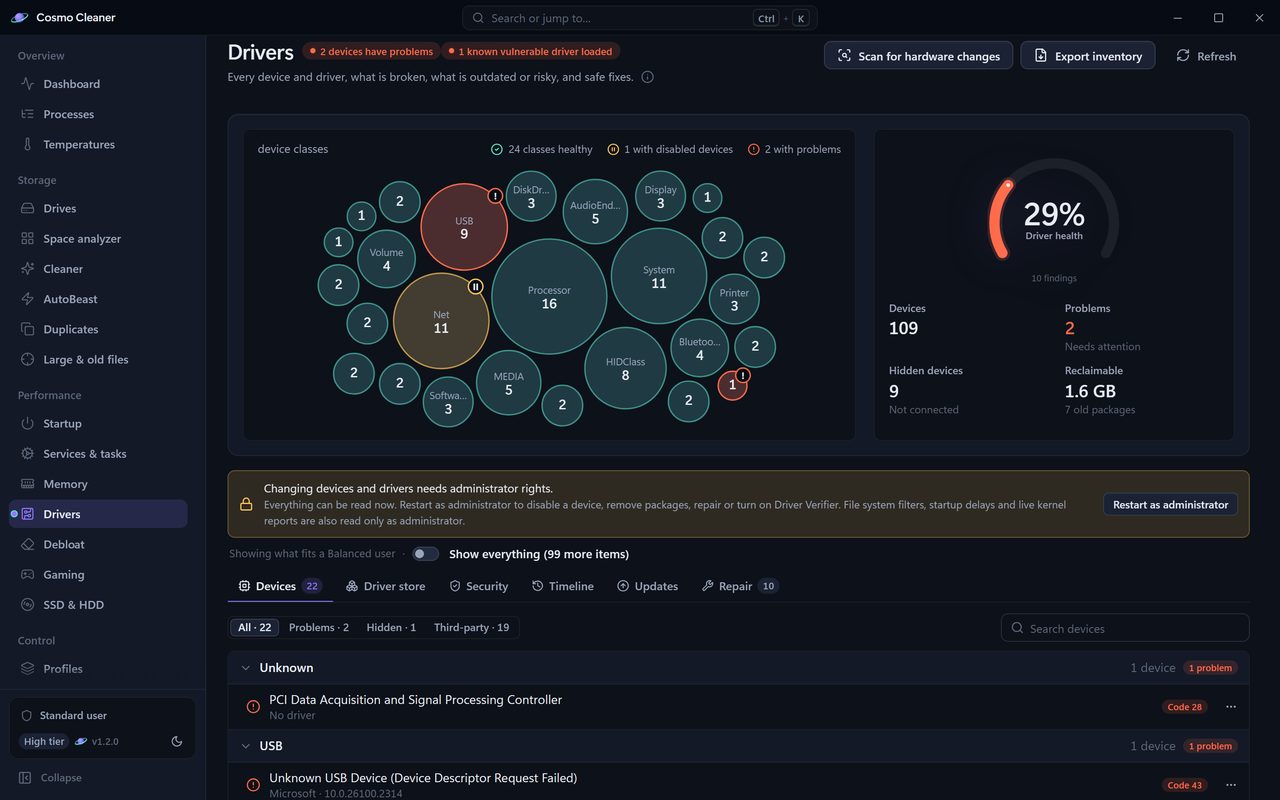
Every driver, and why one is failing.
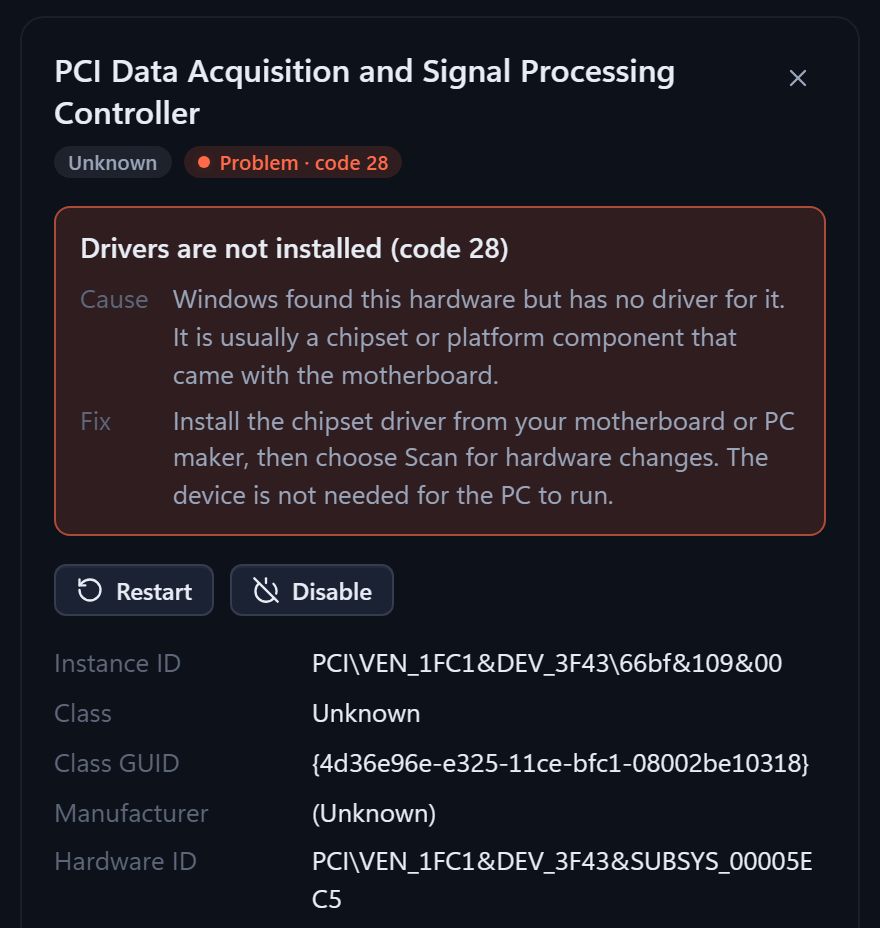
Every device with its Device Manager problem code in plain words: what it means, the likely cause and the fix. Hidden devices that are no longer connected, old packages in the driver store, and the driver checks Windows Security makes, in one place.
- Devicesproblem codes in a sentence, hidden devices
- Driver storeold packages, exported before removal
- Backupevery driver, and a restore
- Securitysignatures, Memory integrity, Microsoft's vulnerable-driver list
- VerifierDriver Verifier status, and a reset
- Crashesstop errors matched to a driver
- Timelinewhat was installed, and when
Clean the store, with a way back.
Old driver packages are exported to a backup before Windows removes them, after a restore point, so you can put them back from the vault. A full driver backup and restore is there for the day you reinstall Windows. Broken class filters, and a Driver Verifier left on that keeps Windows restarting, have their own repairs.
Offline, on purpose.
Cosmo Cleaner never downloads or installs a driver. It lists the driver updates Windows Update has already found for this PC, compares running drivers with an offline copy of Microsoft's vulnerable-driver list, and leaves installing to Windows.
Temperatures new in 1.2
Every temperature Windows reports.
GPU, drives, battery, the firmware's thermal zones and the CPU where Windows exposes it, on one dashboard with the limits the hardware states, throttling and 90 days of history. Cosmo Cleaner reads them without installing a kernel driver, so a sensor Windows keeps hidden is listed with the reason, never guessed. Notifications follow a curve you draw: the hotter a sensor runs, the sooner Cosmo tells you, and Windows notifications wait while a full-screen game runs.
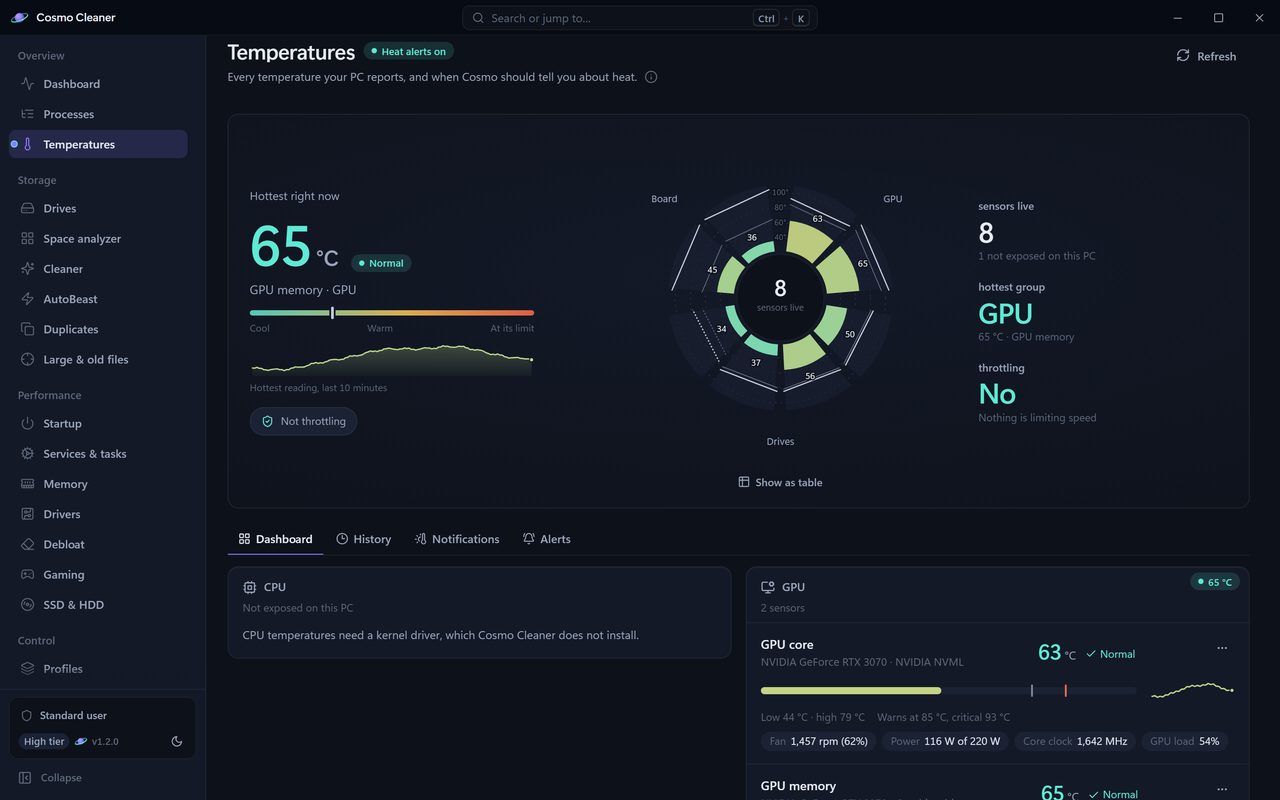
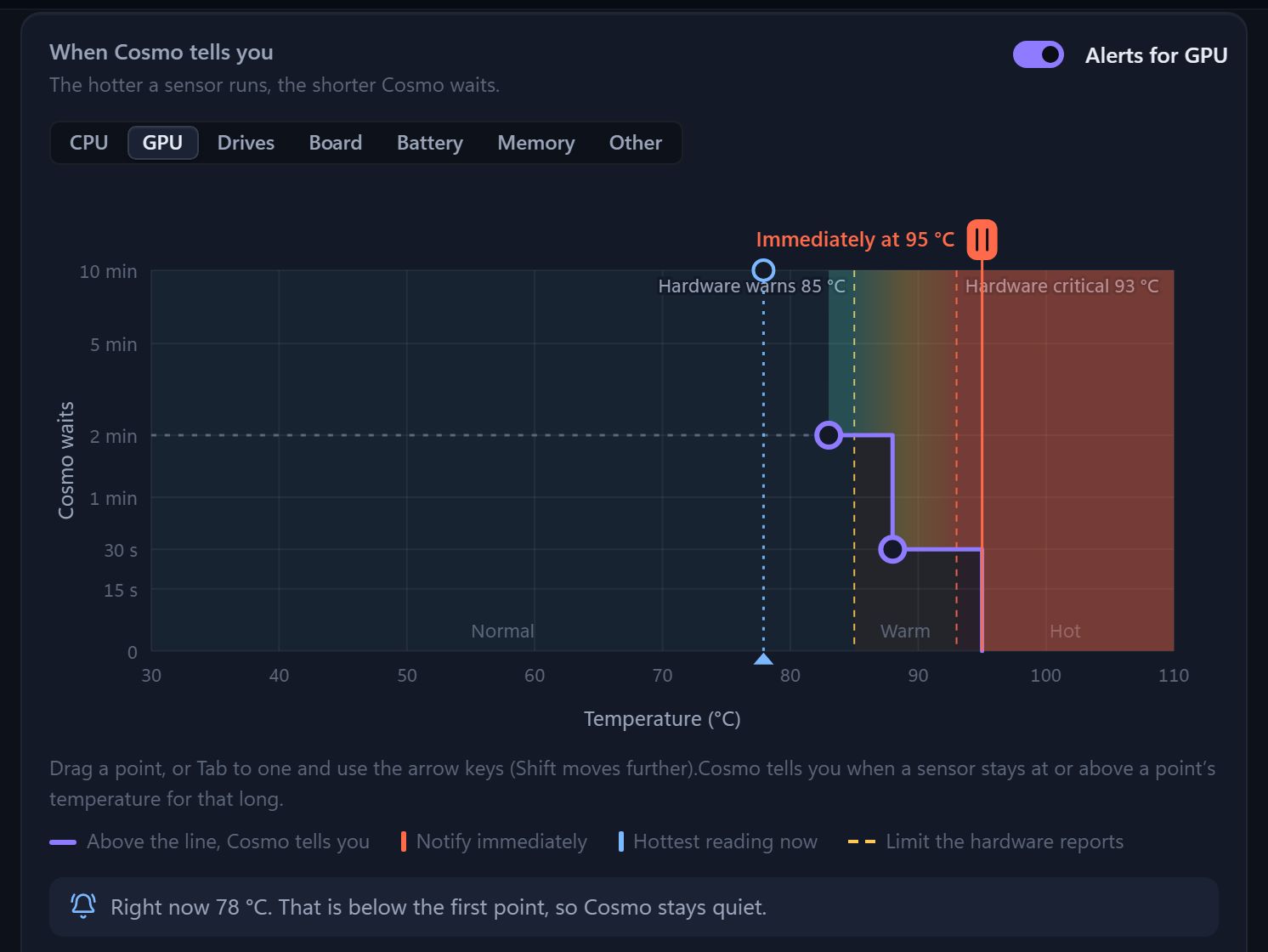
New in 1.2: memory, drivers, temperatures and an ignore list.
Download freeSign‑in and beyond
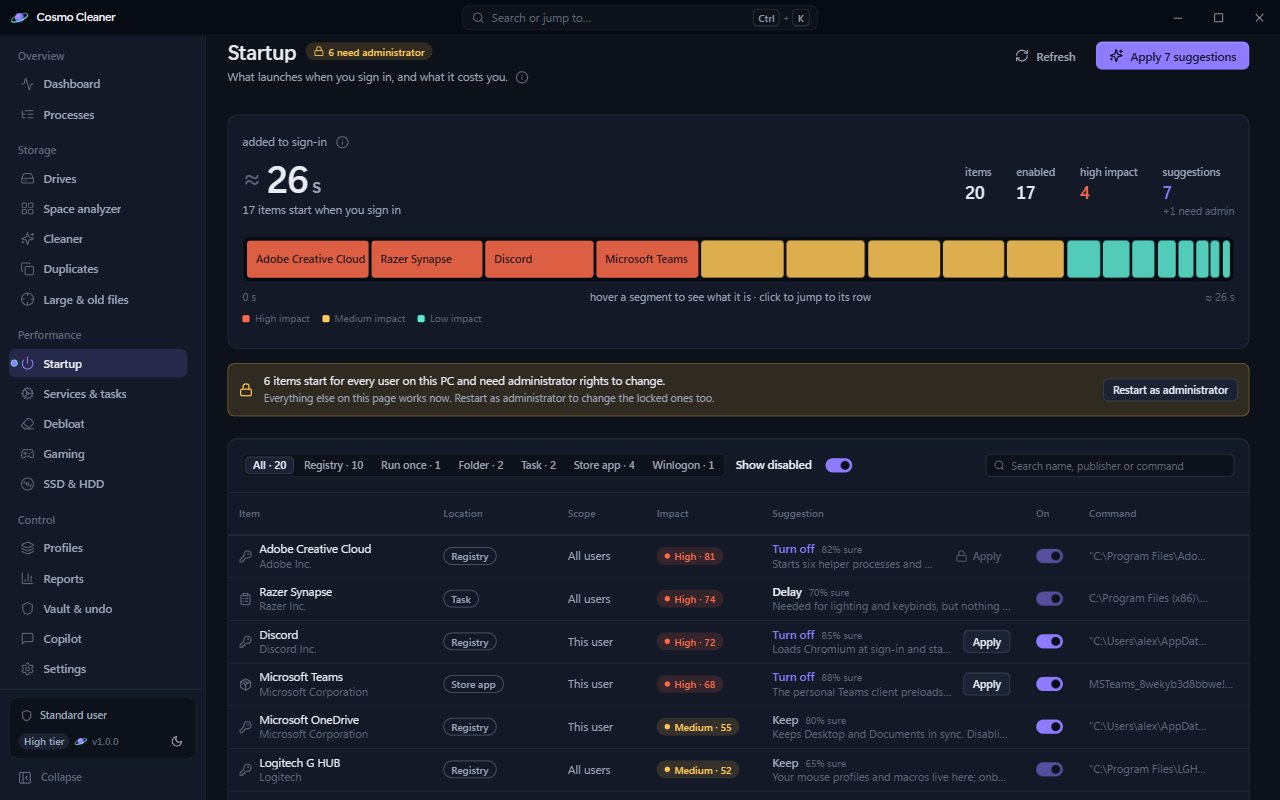
What runs at sign‑in, and what it costs.
A startup manager with impact scores and a suggestion per item. Services and scheduled tasks with safe recommendations. Everything you change is recorded and can be put back.
Debloat, with rollback.
Three tiers. Conservative removes the least, Aggressive the most, Balanced sits between. Every change is recorded and can be rolled back.
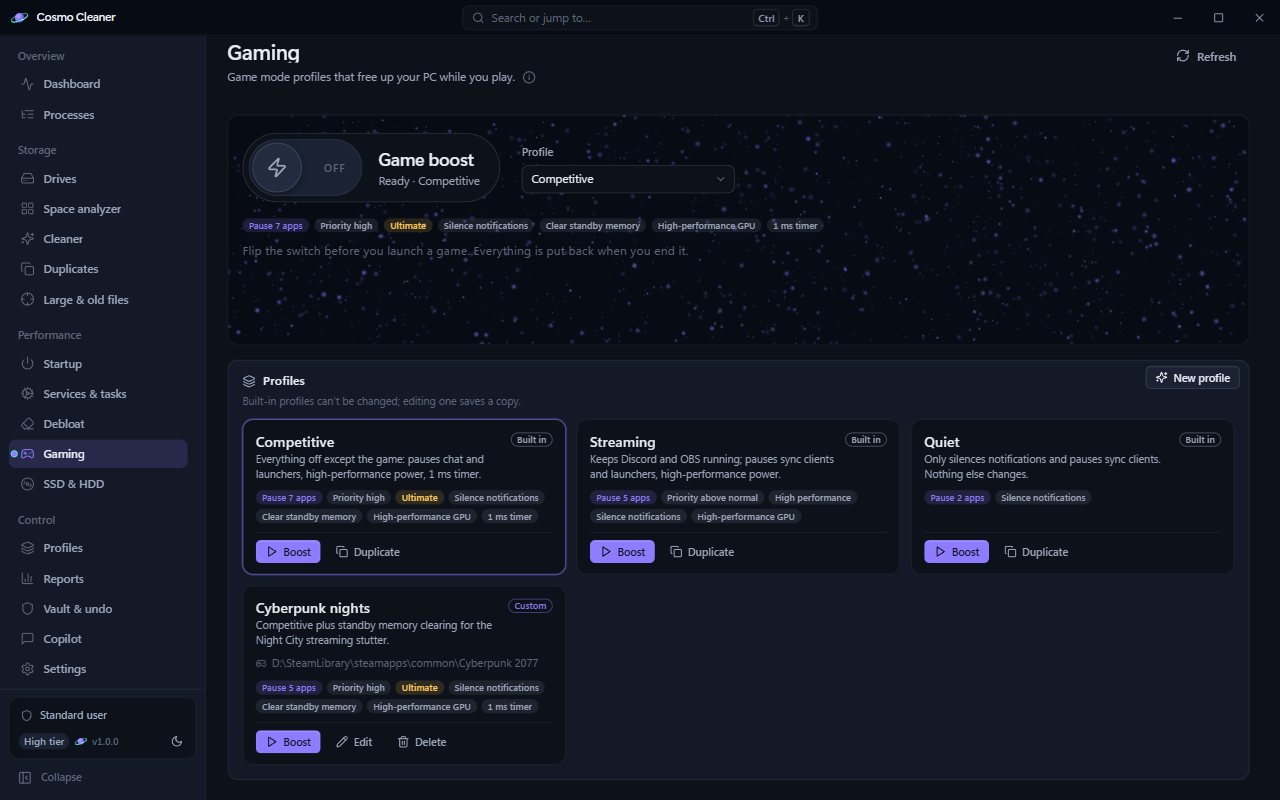
Gaming boost, and drives.
Boost profiles suspend background apps, switch the power plan, set priorities and clear shader caches, then put everything back when you end the session. SSD TRIM (which tells the drive which blocks are free) and HDD defrag when they are worth doing; those need administrator.
- Run Windows component store cleanup
DISM /Online /Cleanup-Image /StartComponentCleanup~3.1 GB · medium risk · in the run report, not the undo journal · restore point first - Send 2.4 GB of NVIDIA installer leftovers to the vaultlow risk · C:\NVIDIA and the driver downloader cache · vault, 30 days
- Remove the previous Windows installation
cleanmgr.exe /sagerun:91~14.0 GB · high risk · cannot be undone · fresh restore point first · go-back window closed - Turn hibernation off
powercfg /hibernate off12.8 GB · medium risk · desktop PC, no battery · reversible with Undo - and 8 smaller steps · 6.9 GB · superseded driver packages, regenerating cachesand 9 more steps · 9.3 GB
Illustration. Your numbers will differ.
AutoBeast new in 1.1
The space you did not know you had lost.
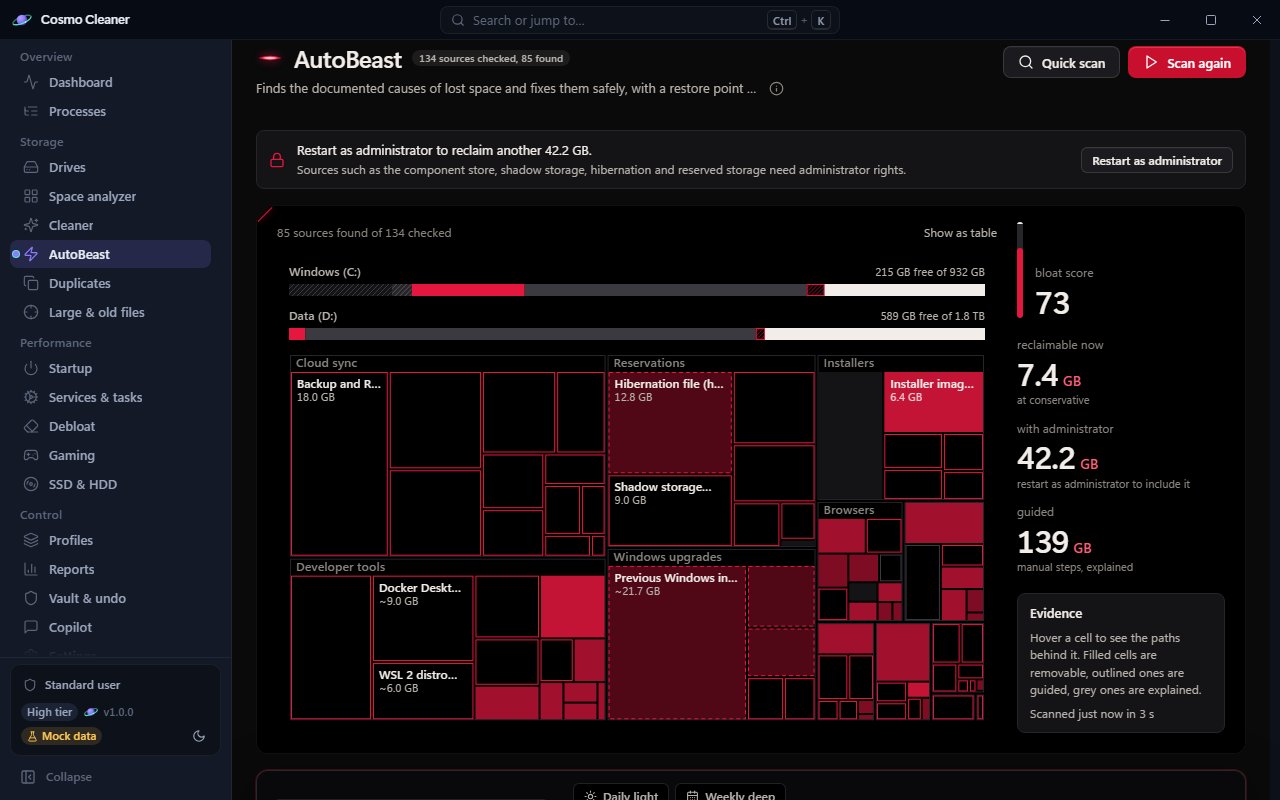
Windows loses space in documented ways: a previous installation, the hibernation file, shadow storage, superseded drivers, a dozen developer caches. AutoBeast knows 134 of these causes across 12 domains, and it measures before it touches anything.
The scan
One sweep, measured.
One pass across the drive. Every source is measured on your PC, not guessed, and the map lights up as it goes: filled cells it can clear on its own, hollow cells it will walk you through, grey cells it can only explain. Your documents, photos, desktop and downloads are never part of it.
The map
What it found.
Free space in bone, bloat in red, system in grey hatching. At Conservative the plan is reversible steps only: about 7.4 GB here. Turn the throttle up and it adds Microsoft's own cleanup tools, then the steps you acknowledge one by one. Lock any source and it is never planned again.
The plan
Written down first.
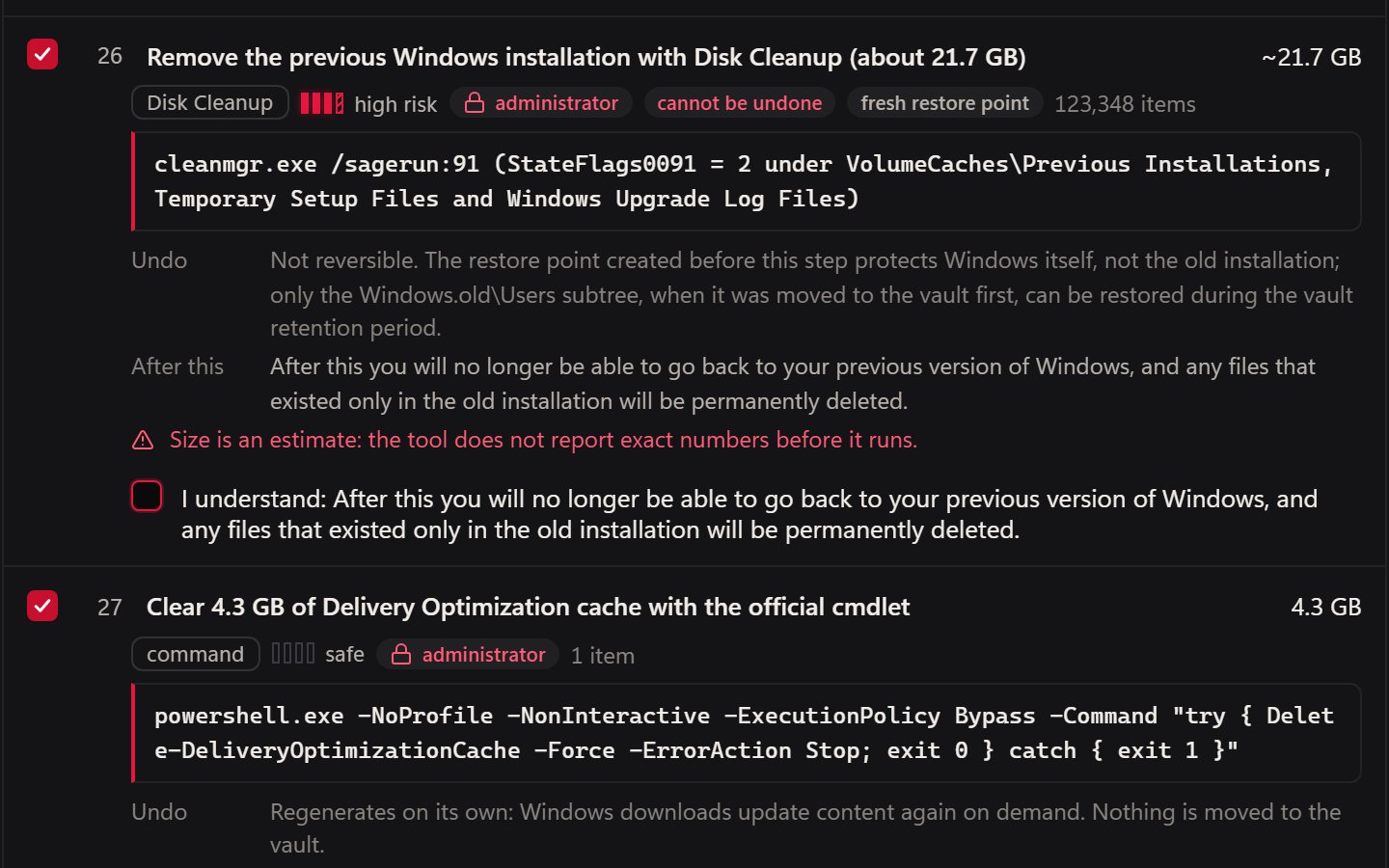
Every step is a sentence with the exact command it will run, its risk, and how it is undone. Nothing is deleted by hand inside WinSxS, System32, Windows\Installer or the driver store; DISM and Disk Cleanup do that work with their documented arguments. A restore point comes before any of it, and a step that needs a fresh one is skipped, not run, if Windows cannot make it.
The tick
Two steps wait for you.
Removing the previous Windows installation cannot be undone, so it waits for your tick. Hibernation is reversible but changes a system setting, so it waits too; here it is left alone and stays. A scheduled run without you skips both and says so in the report.
The run
The bite.
Restore point, then the steps in a safe order: vault moves first, Microsoft's tools last. Each step measures its source again right before it acts, and again after, so nothing is removed on the strength of a scan that is minutes old.
After
Breathe out.
Before and after, per drive, and one Undo that brings the files back and turns a setting back on. What DISM and Disk Cleanup removed lives in the run report, not the undo journal, which is why they run after the restore point and why the previous installation needed your tick. Now, or on a schedule: Daily light, Weekly deep, Space emergency, Gaming clean.
In the app new in 1.1
The bloat map, in the app.
The story above is an illustration. This is the AutoBeast page after a scan, on the app's demo data: one fuel-cell bar per drive, the bloat map beneath it, the throttle and the four profiles, and the plan sheet it writes. AutoBeast ships in 1.1, so it is in the download on this page.
All of it, in one free download.
Download freeControl
One click, or a schedule.
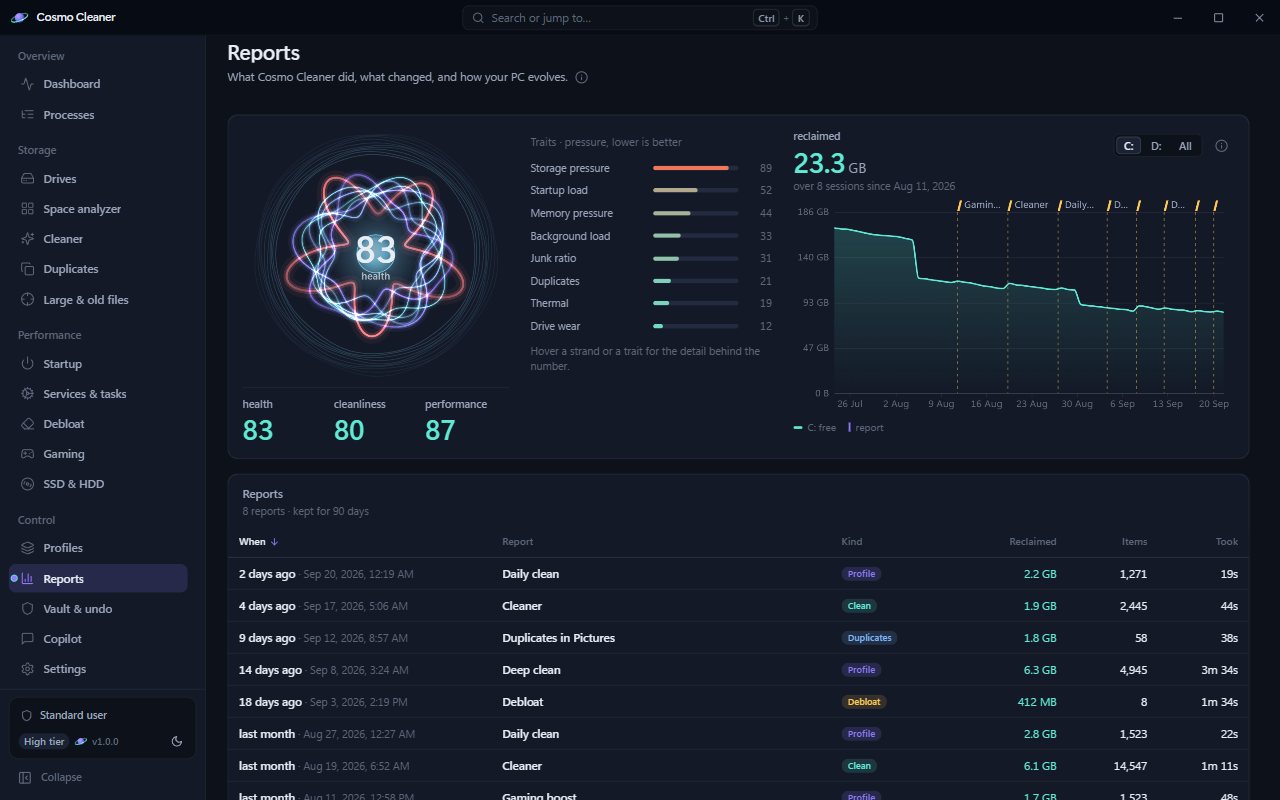
Profiles bundle everything above into one action: Daily clean, Deep clean, Gaming boost, Creator mode, Minimal footprint, or your own. Run them now or on a schedule. Every run leaves a report with before and after, and the trends and System DNA views (a one-page picture of how your PC has changed) show the machine over months.
Cosmo
Ask Cosmo.
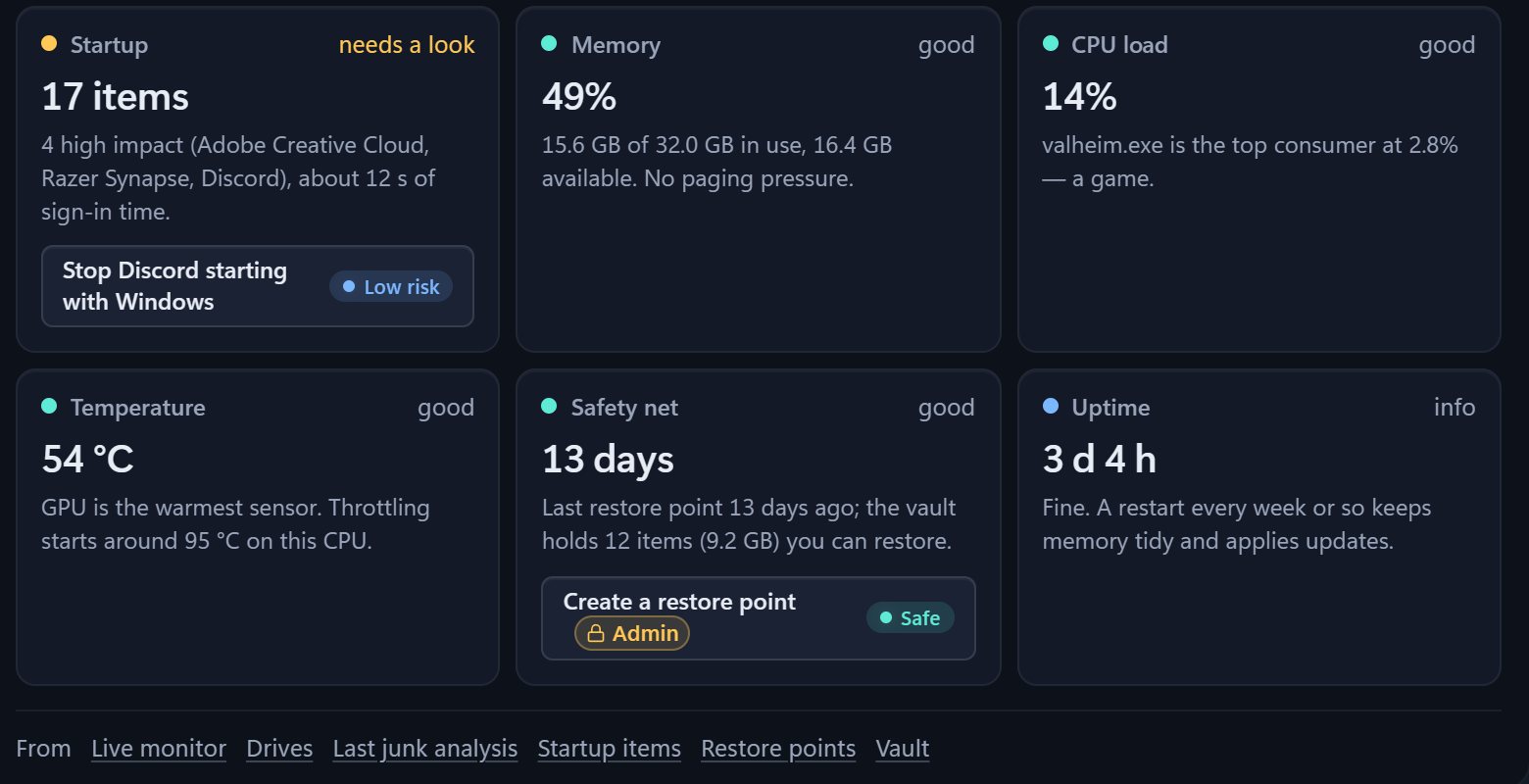
Cosmo, the built-in assistant on the app's Copilot page, answers questions about your PC from live data, runs a guided checkup and suggests actions you confirm. It is a local, rules-based assistant, not a cloud chatbot. If you already run Ollama or LM Studio, it can use that local model too. Nothing of yours goes anywhere.
Ignore list new in 1.2
Tell it what to leave alone.
One list for the whole app, and you can add to it from anywhere. Ignore a folder, a file type, a pattern, a program or a single item, and Cosmo Cleaner never scans, shows or cleans it. Protect it instead, and it stays visible but is never removed or changed. Every scan, clean, move and system change respects the list, and says so when it skips something.
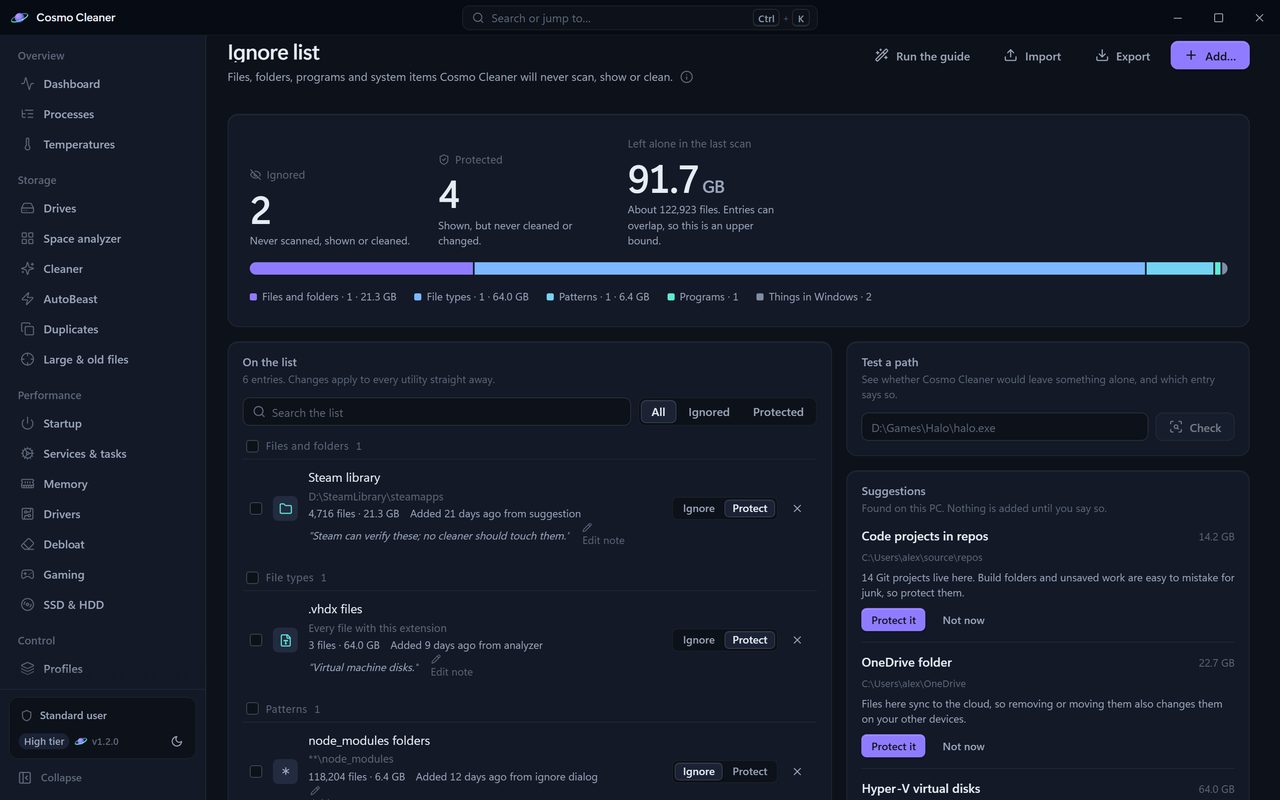
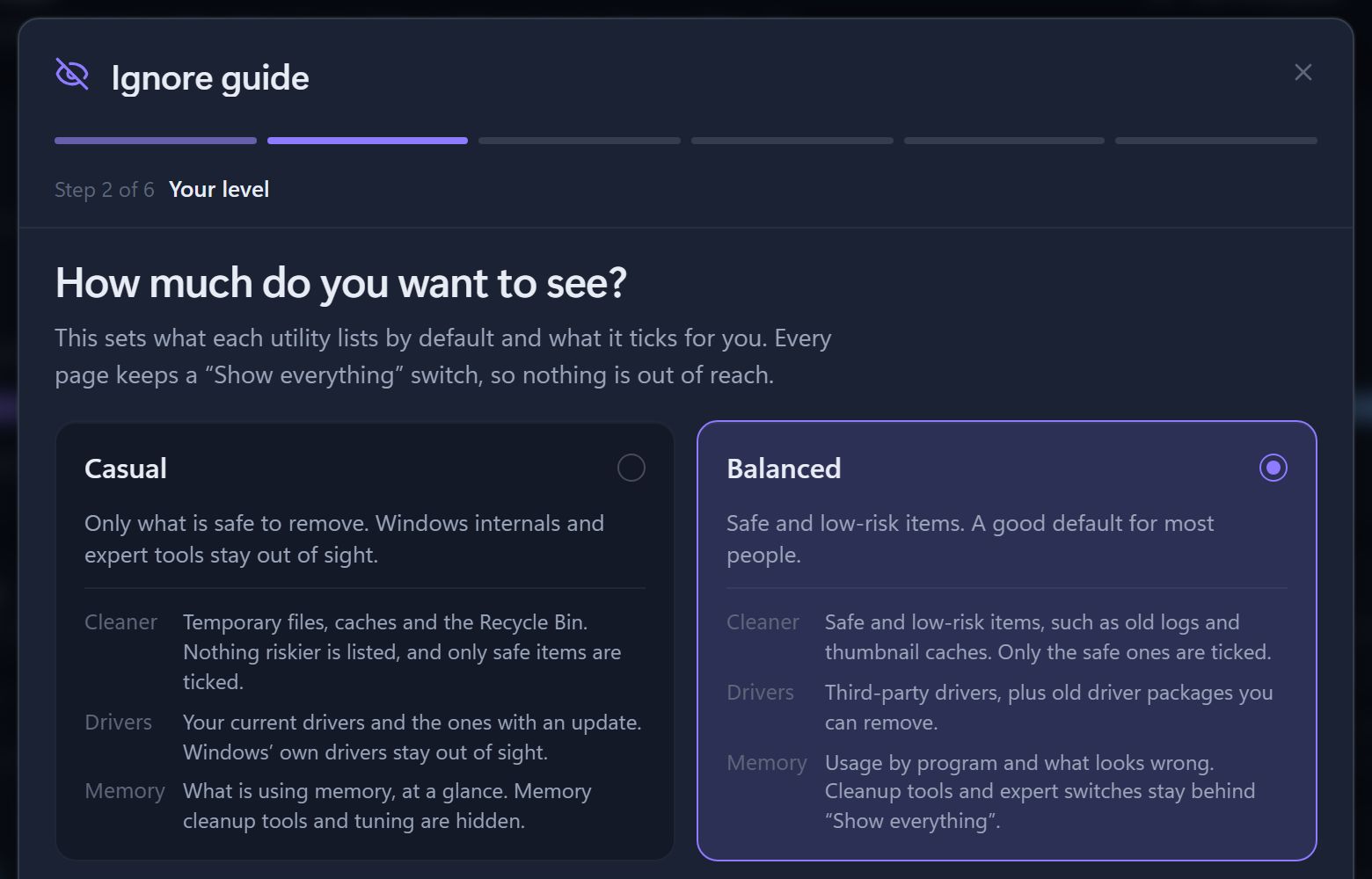
A two-minute guide.
Six short steps find your game libraries, creative tools and project folders and suggest sensible entries. Nothing changes until you have reviewed it, and the whole run can be undone.
Your level, on every page.
Casual, Balanced, Power user or Expert decides what each utility lists and ticks by default, from safe items only to every expert tool. A "Show everything" switch on each page keeps the rest one click away.
In the background
Light when you look away.
Minimized or in the tray, Cosmo Cleaner lowers its priority, gives back memory and pauses its pages. It waits while a scan or a clean is still running, and it is on by default in Settings → General. Measured on one PC, the previous release against 1.2:
- CPU19.1% of one core → 0.5%, started minimized
- Memory221 MB → 32 MB, started minimized
- WebView2392 MB → 60 MB, window minimized
Updates
Signed updates, and nothing else.
Cosmo Cleaner makes one kind of network request: an update check against the Cosmo Cleaner website (a small signed version file, no identifiers, no telemetry), and it downloads an update only when one exists. You can turn it off in Settings → Updates. Nothing about your PC is ever sent.
An update installs only when its signature matches the key built into the app and the zip matches the signed size and SHA-256. It never installs during a scan, a clean or a game boost, and an automatic install never asks for administrator.
Privacy
Zero of everything you were bracing for.
- purchases
- pro tier
- ads
- accounts
- telemetry
- data about your PC sent
Free forever, and no internet needed to work. Cosmo Cleaner makes one kind of network request: an update check against the Cosmo Cleaner website (a small signed version file, no identifiers, no telemetry), and it downloads an update only when one exists. You can turn it off in Settings → Updates. Nothing about your PC is ever sent. There is no crash reporting and no cloud, and everything works with the network unplugged.
One nuance, stated plainly. The app's window is drawn by Microsoft Edge WebView2, a component that ships with Windows. WebView2 follows the Windows diagnostic-data setting and may contact Microsoft on its own. That traffic is Windows', not Cosmo Cleaner's, and it never carries Cosmo Cleaner data.
Its data lives in %LOCALAPPDATA%\CosmoCleaner. To remove it, delete the folder you unzipped and that data folder. That is the whole uninstall.
Download
Clean, calm, free.
One zip. Unzip anywhere, even a USB stick, and run. No installer, no .NET to install, no account to make.
Download free- Version
- 1.2.0
- File
- CosmoCleaner-1.2.0-win-x64.zip
- Size
- 73 MB (76,792,979 bytes)
- SHA-256
- 0592f68036566eb0
ad08a4489412d8a8 c0de7926551335c0 c15a8ffc100ee9da
Requirements
- Windows 10 (version 1809 or later) or Windows 11, 64-bit
- The Microsoft Edge WebView2 runtime, the Edge component the app draws its window with; it is part of Windows 11 and of Windows 10 with Edge
- Administrator for restore points, SSD TRIM, HDD defrag, emptying memory lists, page file and crash dump settings, driver changes and changes that affect every user on the PC; everything else runs as you
How to run it
- Unzip it anywhere. Desktop, Downloads, a USB stick. Settings, the vault and reports live in %LOCALAPPDATA%\CosmoCleaner, not next to the exe.
- Double-click CosmoCleaner.exe.
 It is self-contained, so there is nothing to install first.
 - Pass SmartScreen once. The binary is not code-signed, so on first run Windows shows "Windows protected your PC". Choose More info, then Run anyway.
To verify the download, compare its SHA-256 with the one on this page. In PowerShell: Get-FileHash .\CosmoCleaner-1.2.0-win-x64.zip. For scripts, the same hash is in downloads/CosmoCleaner-1.2.0-win-x64.zip.sha256.
Questions
Is it really free?
Yes. No purchases, no pro tier, no ads, no accounts. There is no license key and nothing to activate; the whole program is what you download.
Why does Windows warn me on first run?
The exe is not code-signed, and SmartScreen warns about any unsigned program the first time it runs. Compare the SHA-256 above with the file you downloaded, then choose More info and Run anyway. It happens once.
Does anything leave my PC?
Nothing about your PC. Cosmo Cleaner makes one kind of network request: an update check against the Cosmo Cleaner website (a small signed version file, no identifiers, no telemetry), and it downloads an update only when one exists. You can turn it off in Settings → Updates. Nothing about your PC is ever sent. There is no crash reporting and no cloud, and scanning, cleaning, monitoring, the vault and Cosmo all work with the network unplugged.
Its window is drawn by Microsoft Edge WebView2, a component that ships with Windows. WebView2 follows the Windows diagnostic-data setting and may contact Microsoft on its own. That traffic is Windows', not Cosmo Cleaner's, and it never carries Cosmo Cleaner data.
Does it update itself?
Yes, unless you turn it off. Two minutes after it starts, and then about once a day, it fetches a small signed version file from this website, with no identifiers and no telemetry. When a newer version is listed, it downloads the zip and checks its signature, size and SHA-256 before installing it. It never installs during a scan, a clean or a game boost, and while the window is open it gives you 30 seconds and a Later button first. Turn it off in Settings → Updates and the updater never connects.
Can I lose files?
Cleaner removals are previewed first and go to the vault for 30 days, where you can restore them. Emptying the recycle bin is permanent, and the app says so before you do it. There is an undo journal and an audit log, and if you run as administrator Cosmo Cleaner can create a restore point before a system-wide change.
How is it different from other PC cleaners?
It shows before it acts. Every clean is previewed with a confidence score and a reason, and what it removes waits in a vault for 30 days. There is nothing to buy, no ads, no bundled offers and no account, and nothing about your PC is ever sent.
How much disk space will it free?
It depends on the PC, and you see the exact figure before anything is removed. The usual big wins are Windows Update leftovers, a previous Windows installation, the hibernation file, temp files, and browser, shader and developer caches.
Is it safe to empty standby memory?
Safe, but rarely useful. Standby is cache that Windows hands back the moment a program needs it, and it refills as you work, so emptying it is not a general speed-up: the next file reads come from disk. The Memory page explains each memory tool this way, and emptying memory lists needs administrator.
Does it update drivers?
No. It never downloads or installs a driver. The Drivers page shows the driver updates Windows Update has already found for this PC, read from Windows' own saved list, and leaves installing them to Windows.
Why is my CPU temperature missing?
Some sensors, such as per-core CPU temperatures, can only be read with a kernel driver, and Cosmo Cleaner never installs or loads one. It shows every temperature Windows does report, such as the GPU, drives, battery and the firmware's thermal zones, and lists a sensor it cannot read with the reason.
Is Cosmo an AI chatbot?
No. Cosmo is a local, rules-based assistant that reads live data from your PC. If you have Ollama or LM Studio installed, it can optionally use that local model. It never calls a cloud service.
What needs administrator?
Restore points, SSD TRIM, HDD defrag, emptying memory lists, page file and crash dump settings, driver changes such as removing packages, disabling a device or Driver Verifier, and changes that affect every user on the PC, such as startup items shared by all accounts. Everything else runs as you.
How do I uninstall it?
Delete the folder you unzipped and %LOCALAPPDATA%\CosmoCleaner. There is no installer and no service. If you turned on "Start with Windows" or the Explorer context menu in Settings, turn them off first.
Which Windows versions?
Windows 10 version 1809 or later and Windows 11, 64-bit only. Windows 7, 8 and ARM are not supported, and there is no macOS or Linux version.
Is the source available?
No. The app is free to use, but its source is not published under an open-source license, so it is not an open-source project.